Prometheus
Monitor NodeLink's performance in production
Prometheus
NodeLink exposes Prometheus metrics out of the box. No plugins, no extra setup, just detailed observability into your audio streaming performance.
What you get
Production metrics that matter:
Audio Quality
Frame delivery rates, nulled frames, deficit tracking
Memory Breakdown
RSS, heap usage, external buffers, V8 spaces
Runtime Health
Event loop lag, GC pauses, CPU load
System Resources
File descriptors, active handles, API traffic
Quick setup
⚠️ Optional Dependency Required
Prometheus metrics require the prom-client package to be installed:
npm install prom-clientWithout this package, NodeLink will throw an error if metrics are enabled in your configuration. You can disable metrics by setting metrics.enabled: false in your config file.
Configure metrics
Metrics are enabled by default. Set your authorization in config.js:
export default {
  options: {
    metrics: {
      enabled: true,
      authorization: {
        type: 'Bearer',
        password: 'your_secret_here'
      }
    }
  }
}
If you leave the password empty, NodeLink uses your server password instead.
Test the endpoint
curl -H "Authorization: Bearer your_secret_here" \
  http://localhost:2333/v4/metrics
You should see:
# HELP nodelink_playing_players Number of active audio players
# TYPE nodelink_playing_players gauge
nodelink_playing_players 5

# HELP nodelink_frames_sent Audio frames sent to Discord
# TYPE nodelink_frames_sent counter
nodelink_frames_sent 150234
Add to Prometheus
Edit your prometheus.yml:
scrape_configs:
  - job_name: 'nodelink'
    scrape_interval: 15s
    static_configs:
      - targets: ['localhost:2333']
    metrics_path: '/metrics'
    authorization:
      type: Bearer
      credentials: 'your_secret_here'
Reload Prometheus:
curl -X POST http://localhost:9090/-/reloadGrafana dashboard
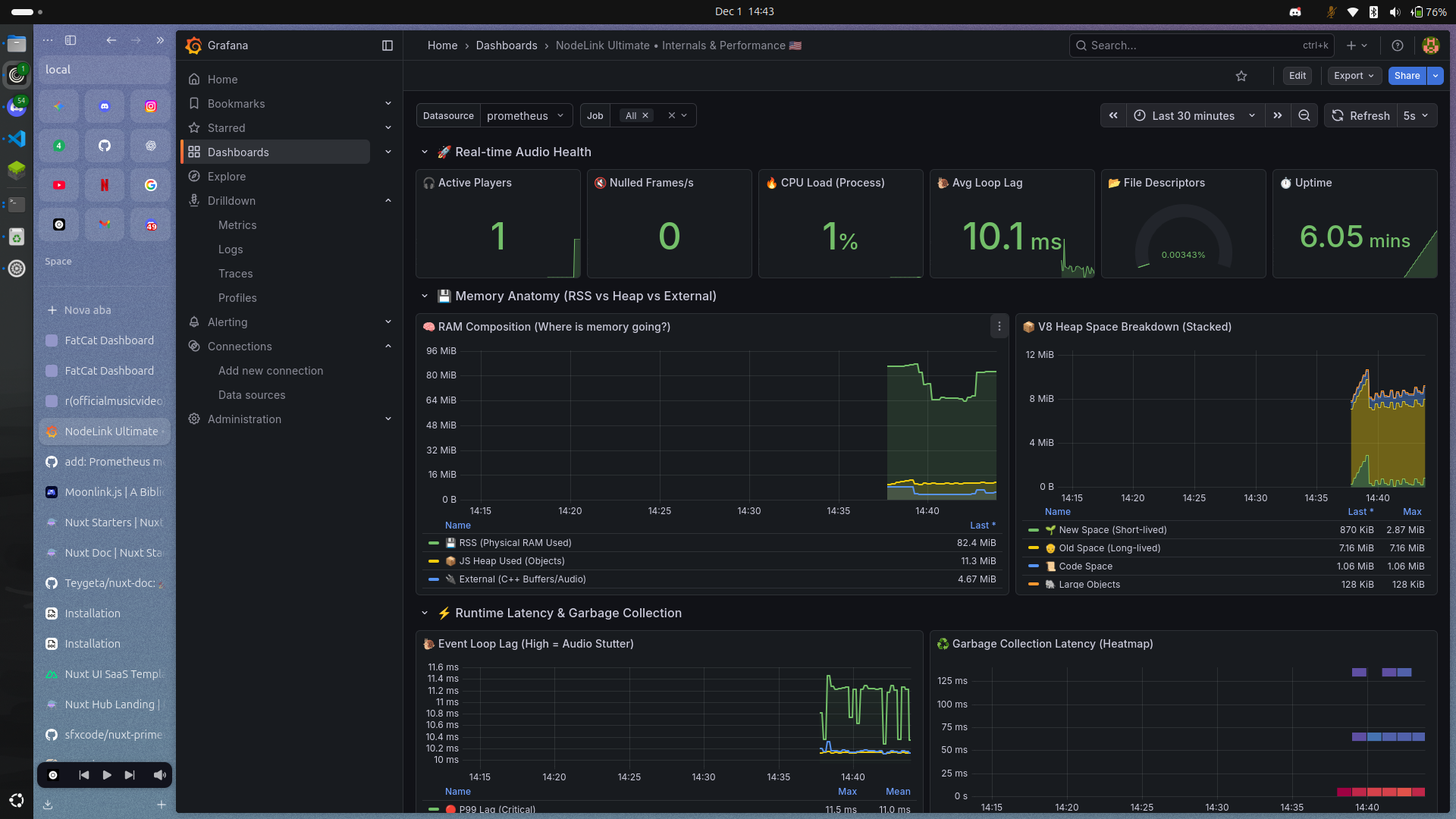
We built a complete dashboard template for quick deployment.
What's included
Real-time audio health with active players, frame rates, and CPU load. Memory anatomy showing RSS vs heap vs external buffers. V8 heap space breakdown for new, old, code, and large objects. Event loop lag percentiles and GC pause heatmap. Frame delivery comparison and quality loss tracking.
Import to Grafana
Import it in Grafana:
- Go to Dashboards → Import
- Paste the JSON or upload the file
- Select your Prometheus datasource
- Done
The dashboard uses two template variables:
$datasource- Your Prometheus instance$job- Job name filter (supports multi-select)
Available Metrics
NodeLink exposes metrics through the /v4/metrics endpoint. All metrics follow the Prometheus format.
NodeLink-Specific Metrics
Players & Playback
| Metric | Type | Description |
|---|---|---|
nodelink_players | gauge | Total number of active players |
nodelink_playing_players | gauge | Number of players currently streaming audio |
nodelink_uptime_ms | gauge | Server uptime in milliseconds |
nodelink_playback_events_total | counter | Total playback events fired |
Audio Frame Statistics
| Metric | Type | Description |
|---|---|---|
nodelink_frames_sent | gauge | Total audio frames successfully sent to Discord |
nodelink_frames_nulled | gauge | Frames that were dropped or nulled (indicates potential audio issues) |
nodelink_frames_deficit | gauge | Difference between expected and actual frames (positive = lag) |
nodelink_frames_expected | gauge | Total number of frames that should have been sent |
High frames_nulled or positive frames_deficit indicates audio quality problems.
API & Source Tracking
| Metric | Type | Description |
|---|---|---|
nodelink_api_requests_total | counter | Total API requests (labeled by endpoint) |
nodelink_api_errors_total | counter | API errors counter |
nodelink_source_requests_total | counter | Requests to audio sources (YouTube, Spotify, etc.) |
Example endpoints tracked: /v4/loadtracks, /v4/stats, /v4/info, /v4/loadlyrics
System Resources
| Metric | Type | Description |
|---|---|---|
nodelink_memory_free_bytes | gauge | Free system memory |
nodelink_memory_used_bytes | gauge | Memory used by NodeLink process |
nodelink_memory_allocated_bytes | gauge | Total allocated memory |
nodelink_memory_reservable_bytes | gauge | Available reservable memory |
nodelink_cpu_cores | gauge | Number of CPU cores available |
nodelink_cpu_system_load | gauge | System-wide CPU load average |
nodelink_cpu_nodelink_load | gauge | NodeLink process CPU usage (0-1 scale) |
Node.js Runtime Metrics
These are automatically collected by prom-client and provide deep insights into the Node.js process.
Event Loop
| Metric | Type | Description |
|---|---|---|
nodejs_eventloop_lag_seconds | gauge | Event loop lag |
nodejs_eventloop_lag_min_seconds | gauge | Minimum recorded lag |
nodejs_eventloop_lag_max_seconds | gauge | Maximum recorded lag |
nodejs_eventloop_lag_mean_seconds | gauge | Mean lag |
nodejs_eventloop_lag_stddev_seconds | gauge | Standard deviation |
nodejs_eventloop_lag_p50_seconds | gauge | 50th percentile (median) |
nodejs_eventloop_lag_p90_seconds | gauge | 90th percentile |
nodejs_eventloop_lag_p99_seconds | gauge | 99th percentile |
High lag values indicate the event loop is blocked, which can cause audio stuttering.
Memory & Heap
| Metric | Type | Description |
|---|---|---|
nodejs_heap_size_total_bytes | gauge | Total heap size |
nodejs_heap_size_used_bytes | gauge | Used heap size |
nodejs_external_memory_bytes | gauge | External memory (C++ buffers, audio data) |
nodejs_heap_space_size_total_bytes | gauge | Heap space size by type (new, old, code, large_object, etc.) |
nodejs_heap_space_size_used_bytes | gauge | Used heap space by type |
nodejs_heap_space_size_available_bytes | gauge | Available heap space by type |
Heap spaces include: new, old, code, large_object, trusted, and more.
Garbage Collection
| Metric | Type | Description |
|---|---|---|
nodejs_gc_duration_seconds | histogram | GC pause durations by kind (minor, major, incremental, weakcb) |
Frequent or long GC pauses can impact audio streaming performance.
Active Resources
| Metric | Type | Description |
|---|---|---|
nodejs_active_handles | gauge | Active libuv handles by type (Server, Socket, Pipe, etc.) |
nodejs_active_handles_total | gauge | Total active handles |
nodejs_active_requests | gauge | Active libuv requests |
nodejs_active_requests_total | gauge | Total active requests |
nodejs_active_resources | gauge | Active resources by type (Timeout, TCPWrap, etc.) |
nodejs_active_resources_total | gauge | Total active resources |
Process Info
| Metric | Type | Description |
|---|---|---|
nodejs_version_info | gauge | Node.js version information |
process_resident_memory_bytes | gauge | Resident Set Size (physical RAM used) |
process_virtual_memory_bytes | gauge | Virtual memory size |
process_open_fds | gauge | Number of open file descriptors |
process_max_fds | gauge | Maximum file descriptors allowed |
Example Queries
Audio Quality
| Metric | Type | Description |
|---|---|---|
nodelink_playing_players | Gauge | Active players streaming audio |
nodelink_frames_sent | Counter | Successfully delivered audio frames |
nodelink_frames_expected | Counter | Frames expected (3000/min per player) |
nodelink_frames_nulled | Counter | Empty frames sent |
nodelink_frames_deficit | Gauge | Difference between expected and sent |
Keep deficit near 0 for smooth audio. Spikes indicate stuttering.
Alerting Rules
Example rules for production monitoring.
Audio Degradation
groups:
  - name: nodelink_audio
    interval: 30s
    rules:
      - alert: HighFrameDeficit
        expr: nodelink_frames_deficit > 100
        for: 1m
        labels:
          severity: warning
        annotations:
          summary: "Audio quality degraded"

      - alert: FrequentNulledFrames
        expr: rate(nodelink_frames_nulled[5m]) > 5
        for: 2m
        labels:
          severity: critical
        annotations:
          summary: "High nulled frame rate"
Performance Issues
- alert: HighEventLoopLag
  expr: nodejs_eventloop_lag_p99_seconds > 0.1
  for: 2m
  labels:
    severity: warning

- alert: MemoryLeakSuspected
  expr: |
    (nodejs_heap_size_used_bytes - nodejs_heap_size_used_bytes offset 1h)
    / nodejs_heap_size_used_bytes offset 1h > 0.5
  for: 30m
  labels:
    severity: warning
Event loop lag above 100ms causes audio stuttering and API slowdowns.
Pro Tips
Frame deficit should stay within ±50. Large spikes need immediate investigation.
External memory grows with active players. Each player holds decoded audio buffers, this is normal behavior.
Watch for GC pauses over 100ms. Frequent long pauses mean you should increase heap size or reduce player count.
Event loop lag spikes indicate blocking code. Use Node.js profiler to find synchronous bottlenecks.
Use recording rules to pre-aggregate expensive queries:
- record: nodelink:frame_delivery_rate
  expr: rate(nodelink_frames_sent[5m])
For retention beyond 2 weeks, consider pairing Prometheus with Thanos or Cortex.